 한국어
한국어
 Azərbaycan
 Čeština
 English
 Español
 Français
 Ελληνικά
 हिन्दी
 Indonesia
 Italiano
 Português
 Русский (др. страны)
 Русский (Россия)
 Türkçe
 Українська
 العربية
 简体中文
简体中文
 繁體中文
繁體中文
 日本語
日本語
 Қазақ
Қазақ
Subscription and paid features allow you to use the service to its full potential by disabling ads and providing access to unique tools.
How to Find the Section
- On the main app screen, tap the Paid Features section (wallet icon).
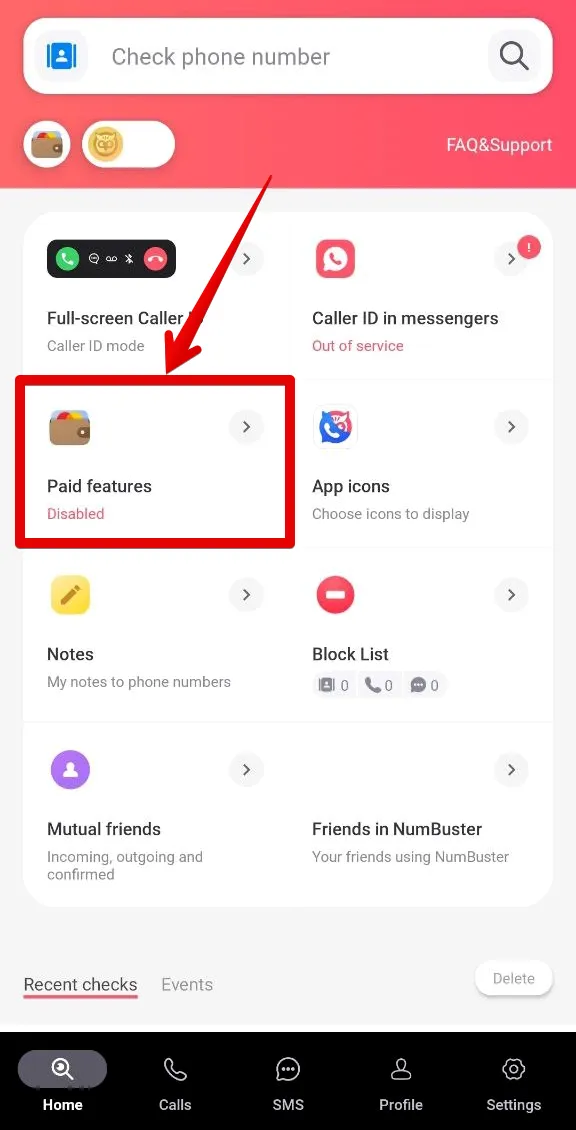
- Select the SMART subscription and confirm your agreement with the terms of use.
- Specify a convenient service for the payment and complete the purchase with a bank card.
What Is Included in the Subscription
- Blocking access to the phone number page—block access to your page for users who do not know your full phone number (for example, those who clicked from comments or visit history).
- Access to NeurOwl—get AI opinions that analyze phone number behavior and generate a report that goes beyond a standard check.
- More cards on the page—turn your account into a full-fledged showcase by placing additional cards describing your goods and services.
- Animated icon—highlight your primary name on the phone number page, in the widget, and on the call screen.
- Details tab—open and view expanded information on phone number pages.
- SMART tag—use a special label to attract additional attention to your phone number page.
- No ads—use the app with maximum comfort.
Important: information in the Details tab may be unavailable if it is hidden due to local law requirements or by the decision of the user managing the data of this phone number.
 기능
기능


 Tariffs
 도움말
도움말